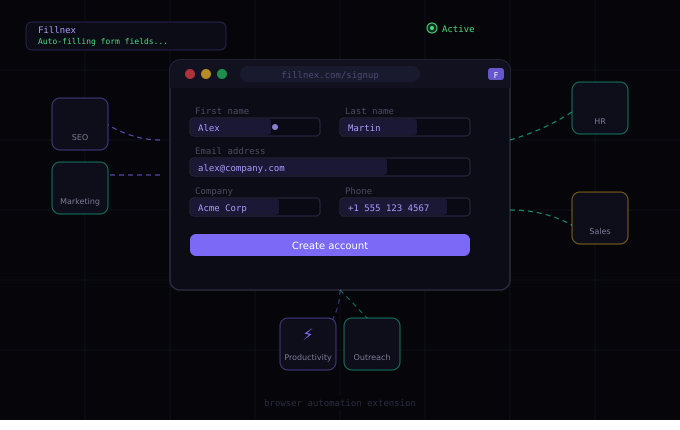
If you spend more than an hour a day filling out online forms, creating accounts, or submitting the same information to different platforms, a browser automation extension can give that time back. Here’s what they do, how they work, and who actually needs one.
What Is a Browser Automation Extension?
A browser automation extension is a tool installed directly in your browser that automates repetitive web-based tasks. Unlike desktop automation software that requires programming knowledge, browser extensions work through a simple interface — you record what you want automated, and the extension replays it.
The most common use case is form filling: instead of typing your name, email, address, and other information into every new form you encounter, you save it once and let the extension fill every form automatically.
But modern browser automation extensions go much further:
- Bulk campaigns — fill the same form on hundreds of different sites automatically
- Form Replay — record complex multi-step flows and replay them on demand
- AI-assisted filling — unknown fields are filled intelligently based on context
- CAPTCHA solving — automatic CAPTCHA handling via integrated solving services
- Scheduling — run automated tasks at specific times without manual intervention
The Problem They Solve
The average knowledge worker fills out 5–15 online forms per day. Registration forms, submission forms, application forms, survey forms, outreach forms. Each one requires typing the same core information — name, email, company, phone — over and over.
Multiply that across a team, a month, a year. The cumulative time cost is significant. Studies on workflow productivity consistently find that repetitive data entry is one of the highest-leverage areas for automation — high frequency, low value, easily systematized.
Browser automation extensions attack this category directly. Once configured, they eliminate the manual data entry overhead entirely for forms that match your saved profiles.

How Browser Automation Extensions Work
At the technical level, a browser extension runs JavaScript in the context of any web page you visit. This gives it access to the page’s DOM — the structure of HTML elements, including form fields, buttons, and dropdowns.
When you trigger a fill, the extension:
- Scans the page for input elements (text fields, dropdowns, checkboxes, date pickers)
- Identifies what each field is asking for by reading its name, ID, label, placeholder, and surrounding context
- Matches each field to the appropriate value from your saved profile
- Injects the values using native browser APIs to ensure React, Vue, and other frameworks register the changes
- Triggers the appropriate events (input, change, blur) so the page responds correctly
For fields it can’t identify automatically, it either calls an AI model for context-aware guessing, or lets you assign the field type manually with a right-click.
Who Uses Browser Automation Extensions
SEO professionals — submitting sites to directories, building citations, creating accounts on link-building platforms. High-volume, repetitive, and time-consuming without automation.
Marketers — registering on outreach platforms, submitting press releases, creating profiles on industry directories and review sites.
Recruiters and HR teams — filling applications, submitting candidate profiles to job boards, completing onboarding forms across multiple platforms.
Sales teams — registering for lead generation platforms, submitting contact information to partner directories, completing vendor onboarding forms.
Developers and QA engineers — testing form behavior across different data sets, automating test account creation, filling staging environment forms during development.
Administrative professionals — any role that involves processing paperwork, completing compliance forms, or managing registrations at scale.
The Difference Between Autofill and True Automation
Chrome’s built-in autofill and password managers offer basic form filling. But they’re designed for one person filling their own information on a handful of personal sites. The gap between basic autofill and a full browser automation extension is significant:
- Autofill: one profile. Automation: unlimited profiles
- Autofill: one site at a time. Automation: bulk campaigns across hundreds of sites
- Autofill: standard HTML forms. Automation: React apps, custom dropdowns, multi-step flows
- Autofill: no CAPTCHA handling. Automation: integrated CAPTCHA solving
- Autofill: no scheduling. Automation: campaigns run on schedule automatically
If your use case involves more than personal convenience — if you’re processing volume, managing multiple identities, or running batch workflows — you need automation, not just autofill.
What to Look for in a Browser Automation Extension
When evaluating options, the key capabilities to assess:
- Field detection accuracy — how well does it identify non-standard field names?
- Custom field assignment — can you manually assign field types for sites it doesn’t recognize?
- Multi-step flow support — does it handle forms that span multiple pages?
- CAPTCHA integration — does it solve CAPTCHAs automatically?
- Campaign management — can you run the same fill across a list of URLs automatically?
- Profile management — can you maintain separate profiles for different use cases or clients?
- AI assistance — does it handle novel field types intelligently?
Fillnex is built to cover all of these. It works on Chrome and Firefox, handles everything from simple registration forms to complex multi-step corporate onboarding flows, and scales from individual use to agency-level bulk campaigns.
Automate your browser workflows
Start your 7-day free trial — no credit card charged until trial ends.
Start Free Trial →